
Compliance reports
Audit-Ready AED Compliance Reports
AED Log turns your program into an AED compliance report in a few clicks: inventory, inspection history, expirations, incidents, certifications and the audit trail. Download any of them as a CSV or a branded PDF, so the AED inspection log is ready when an auditor asks.
45 days free. No credit card required. Then plans from $114 a year.

How compliance reports work
Pick a report, narrow it with filters and download it as a CSV for a spreadsheet or a branded PDF for an auditor. A report only ever includes what the person running it is allowed to see.
Pick a report
Choose from the six reports on the Reports page, from the AED inventory to the audit trail. Each one is ready to run, with nothing to set up.
Filter it
Narrow a report to several locations at once or to a date range. The Expiration Forecast takes a horizon from a month to two years and can group its rows by month.
Download a CSV or a branded PDF
CSV files open in any spreadsheet for your own AED data management. PDFs carry your branding and are laid out for printing or sending.
Every download is recorded
Each report run is written to the activity log with who ran it and which filters they used. Filters only ever narrow what a person can already see.
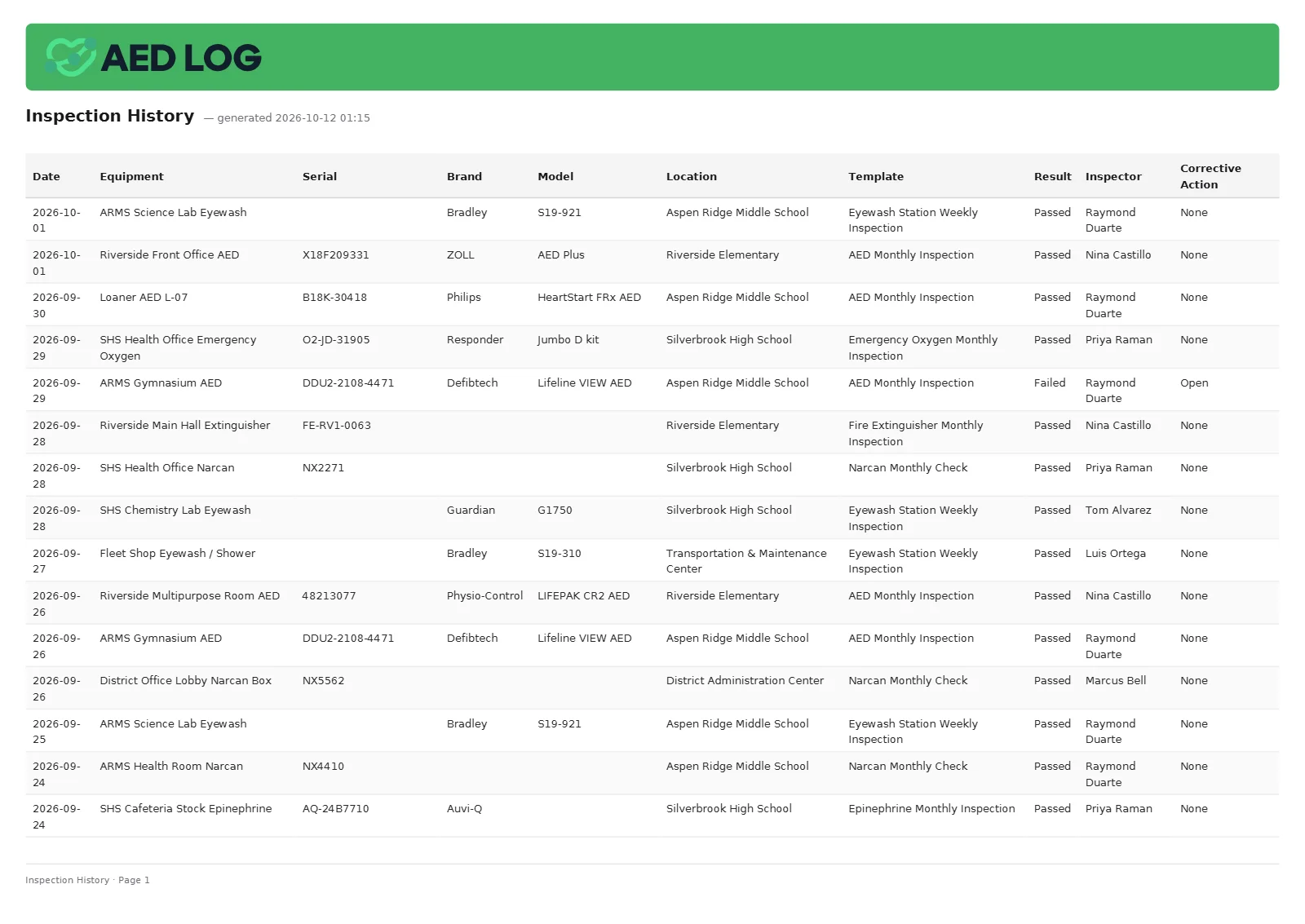
What each of the six reports includes
Together the reports cover the whole program, and each one downloads as a CSV or a PDF.

Equipment and AED Inventory: every unit with its serial number, pad and battery dates and assignee
Inspection History: every inspection, with the unit's serial number, brand, model and result
Expiration Forecast: everything expiring over your chosen horizon, grouped by month
Incident Log: every incident, with patient columns only for permitted roles
Certification Status: every responder's certifications and when they expire
Audit Trail: who did what and when, for Account Owners and Administrators
Who it is for: municipalities and multi-location organizations
Reports matter most to organizations that answer to someone, whether that is a city council, a risk manager or a head office.


Related guide: AED inspection requirements
For the inspections that laws and manufacturers expect, and the records to keep, read the AED inspection requirements guide.
AED inspection requirements AED inspection tracking Activity log and security
AED compliance reports FAQ
Be ready for the next audit
Download inventory, inspection, expiration, incident and certification reports as a CSV or a branded PDF.
45 days free. No credit card required. Then plans from $114 a year.